Showing posts with label ubuntustudio. Show all posts

Thursday, June 21, 2007

StarCraft

Unless you live under a rock, you have probably already heard about StarCraft II. Which was recently announced by Blizzard. Of course, this got me nostalgic for the original, which of course gave me a good excuse to see if I could get it working on my Ubuntu with wine.

So, here were the steps:

Insert original windows StarCraft CD.


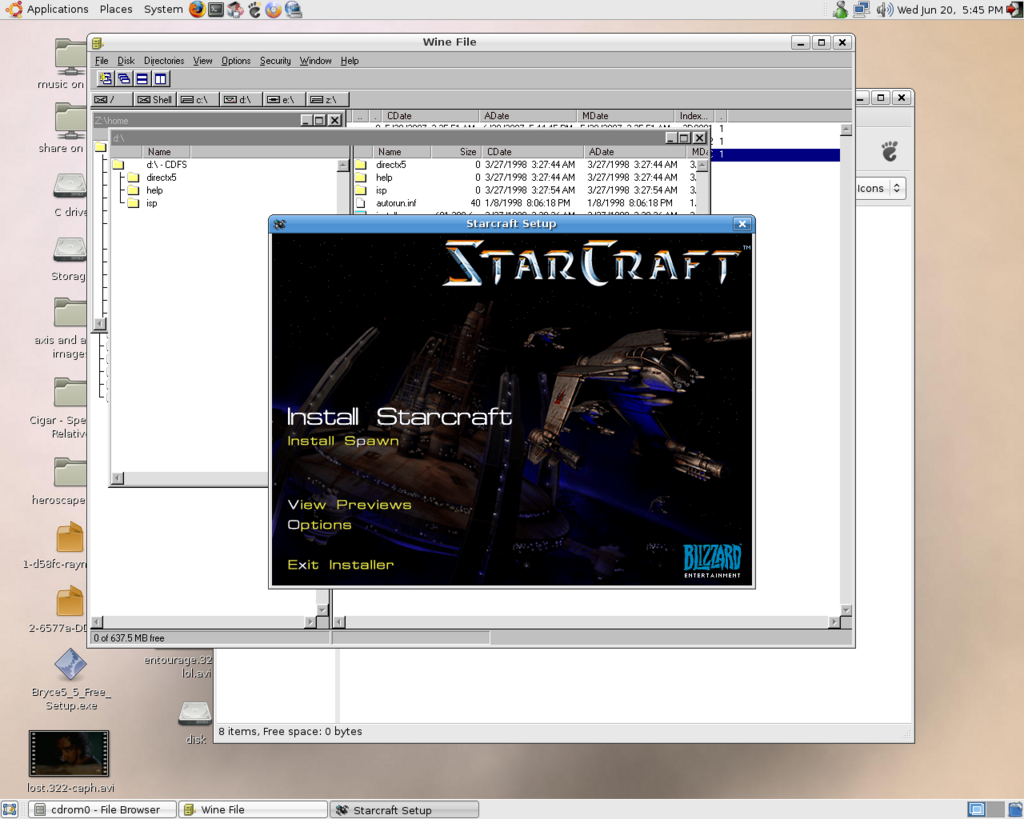
Open terminal type, winefile, and then browse to CD, and run setup.exe
look at that - the setup screen - SHOCKING! then complete setup, choosing your favorite location to install.

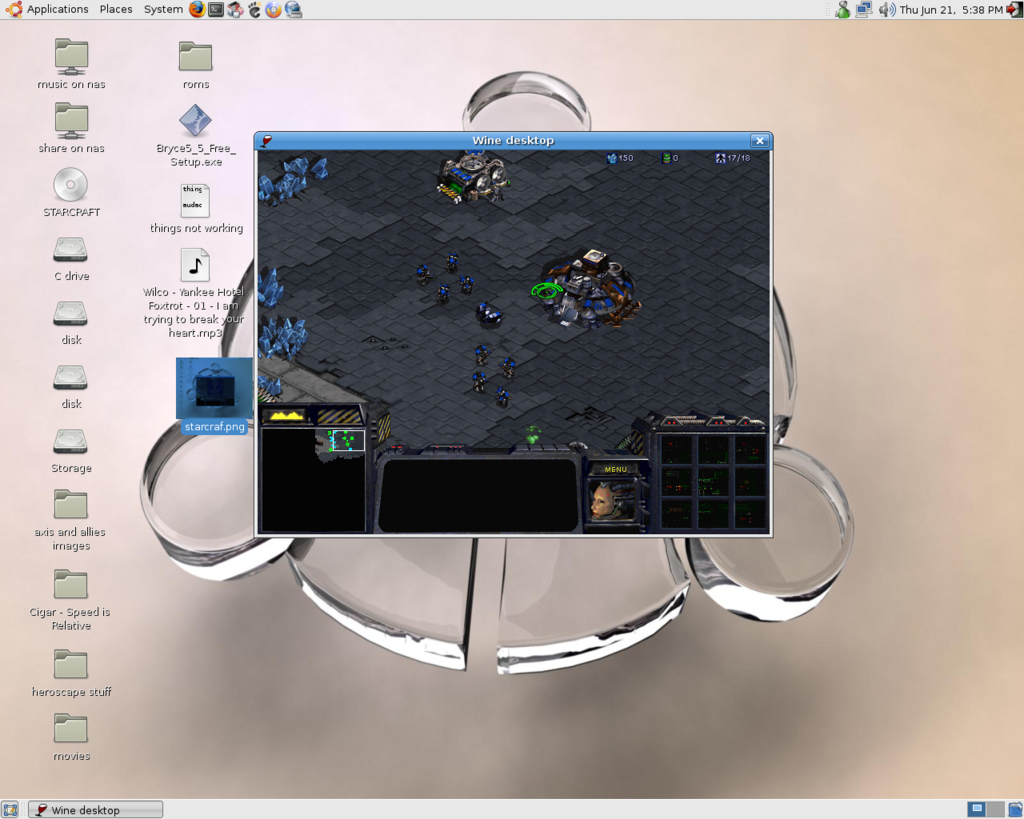
Now, under the applications menu, wine, programs, StarCraft, and "it just works"!
Well, not in a window, I just ran it in a window for this screen shot - it works in full screen normally.
Uhhh, and "it just works" except for the sound, which sort of stutters.

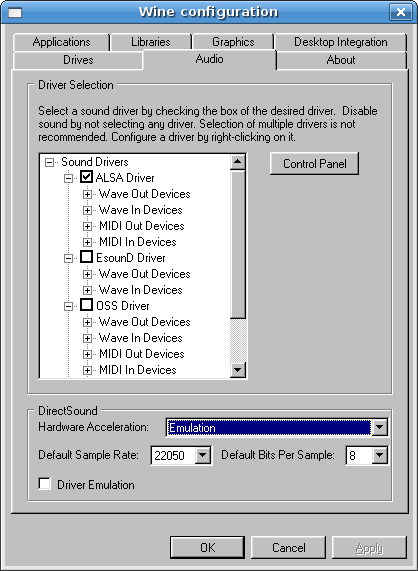
But I was able to fix that by launching the wine configuration utility (terminal: winecfg):

Then changing the audio settings direct sound hardware acceleration from full, to emulation.
Now it runs just fantastically. GO WINE!

Wednesday, June 20, 2007

Ubuntu Challenge - THE RESULT

Here we are, at the end of the Ubuntu challenge. One month without Windows, living my home computing life on Ubuntu Studio. So, the final result? Is Windows banished from my desktop? Will I return to Redmond's finest? We'll get to that in a minute.

First let me enumerate and explain the instances where I needed to run Windows:

I had to boot into Windows a couple of times to grab config info, such as my microsoft messenger setup for my AMSN config. But that really does not count - that is just config stuff - not something I needed to run in Windows.

I had an external disk that I had brought home from work. Ubuntu identified it as being dismounted from Windows incorrectly, and would not mount. So I booted the machine to Windows, attached it, went through Windows' safe hardware removal process, and then it worked fine in Ubuntu. Now, I probably could have figured out a way to make this work without the Windows boot - but I figured that was the quickest way from point A to point B.

During my recent server drama I decided I needed to cut down on the amount of data on my server. A lot of that junk just needed to be burnt off to DVDs and put on the shelf. So I started archiving with Brasero. However Brasero started giving me errors during creation of data DVDs. So I booted back to Windows, mainly to check and see if there was something else amiss. Under Windows I had no issues at all burning the disk. This led me down a long and quite boring path of trying to figure out WHY it was doing this. But that is another story that I won't get into here...

But that's that is it. Those were the only instances where I needed to boot into Windows.

You will notice that I did not need to boot into Windows to DO anything - mainly to fix or test little issues in the quickest way I knew how. And that is a critical point - there really wasn't anything that I really wanted to do, that I could not do in Ubuntu.

That is not to say that I didn't have to work to get there - there were some pretty annoying things, like setting up DVD playback. But in general it was not too bad, and now I know how for the next setup.

And there also may have been a couple of times where i might have wanted to jump on gametap for a quick game fix (especially since they have done some major revamps to the service lately, and now have Tomb Raider Legend AND Tomb Raider Anniversary on there). BUT I really just don't play games enough anymore. I probably wouldn't really even play them for more than a few minutes each. Plus Triple A and Ticket To Ride have kept me occupied - but more on that another time.

So other than a few games that I really doubt I would play much, there isn't much from windows I think I'm missing. And many of those games may run under
Wine, I just haven't really cared enough to check. But what's more, I didn't find myself wanting to run Windows. I never really said, well this would be easier in Windows, or if only I was on windows, this wouldn't be much better. For my needs, I actually think Ubuntu fits me better.

Which is a surprise. I was always more of a fan of KDE than of Gnome. And while there is the KDE based Kubuntu, but since Ubuntu Studio shipped with Ubuntu's standard Gnome, that is what I went with. And to my shock, I really like it. Better than KDE, or Vista. I thought I would find find myself accidentaly doing things the 'Windows way' and then having to catch myself, and do it the 'Ubuntu way'. But that really did not happen. Plus I really like the way the desktop environment works
, and when I'm on Windows at work, I miss my Ubuntu's wobbling windows.

And I have to be honest, I also enjoy the discovery of it all. It sort of reminds me of how stoked I was when windows 95 came out - it was SUCH a big leap forward for windows (basically jumping ahead of the Mac at the time), but keeping all the backwards compatibility it needed. That was right around the time I was first breaking into the computer business, and just the exploration of win95 was fun. I don't think I have felt that way about an OS since. Not even Apple's OSX (which was another quantum leap) had this sort of appeal, but that was mainly because its classic OS implementation was crap, and it obsoleted so much hardware. But Ubuntu has made it fun for me, just to poke around, and find new things, and discover what I can do. And that right there ALONE has made it a great experience for me.

So, the question is, will I be dumping Windows?

The answer is... Sort of.

I will always need to have Windows running somewhere, for work, just as I need to have OSX running somewhere. I would be remiss in my career if I did not.

But Ubuntu is the real deal for me. It is now my main OS. I have machine at work running it now, just for little tasks right now, but it is creeping in.

I can (and have) run a great many Windows apps in Wine, and that pretty much would make it so that I don't NEED Windows. but since I can dual boot Windows and Ubuntu, I don't see why I would ever loose windows all together. (plus there is that whole gametap thing)

I guess the real question is, should my next PC be a Mac, so I could run Ubuntu, Windows, and OSX? its a tough sell, because of the price tag... I'll need to sleep on that one.

Sunday, May 27, 2007

Ubuntu Studio - setup log

As promised, here is my setup log for Ubuntu Studio.

I'll keep it short and to the point, so don't expect flowery prose, just what was done, and why.

first things first - the hard disks:
My PC has 2 HDs, both 150GB in size. I decided to repartition the first one, which also holds my Vista install, in order to fit the Ubuntu installation. This was performed by using BootitNG - which the demo can be downloaded an used to resize an NTFS partition with no data loss - it took about an hour.

So now I had about 30GB of blank space on my first drive.

I booted up with the ubuntu studio DVD, and installed into this blank space. This took about a half an hour.

I then booted into studio, and did auto updates.

Then I tested...

Sound - OK!
Wireless Mouse - OK!
Keyboard - OK!
the video redraw feels slow. I went to the Nvidia site and grabbed their NON-open source driver. Damn, the instructions are convoluted. I'll wait on that.

I can access my windows disks! and just by accident I notice that CBZs view correctly (this is a surprise)

I notice that there under the system, administration, menu there is something called restricted drivers manager, and I enable nvidia driver from there. This requires a reboot, or at least I think it does, I can't recall. Either way I reboot, to make sure I can still get into Vista, which I can. The redraw is a bit better, but I'm still not thinking its perfect...

I then install the adobe flash player for firefox.

I look into Beryl - it looks like it would be pretty cool. I use the package manager to install it. I don't think its doing anything though - so I'll set that aside for a bit.

use add/remove programs to install openoffice.org spreadsheet - this distro only came with the text editor installed.

I now use synaptic to install pptp client and network manager stuff. I proceed to work with on a VPN connection for an hour - no luck (more on this later)

check Divx/Xvid playback - need to load codecs from the install DVD - good to go.


check mp3 playback over samba connection - good to go.

change to glossy theme from ubuntu studio (its to dark!)

install xmms plugin for wma/wmv - its works.

Comercial encrypted DVD support loaded:
in terminal:
sudo apt-get install libdvdread3 libxine1-ffmpeg
This installs the first components - now I need to add the medibuntu repository:
wget -q http://medibuntu.sos-sts.com/repo/medibuntu-key.gpg -O -
| sudo apt-key add -
(that should be one line)

Then

sudo wget http://medibuntu.sos-sts.com/sources.list.d/feisty.list
-O /etc/apt/sources.list.d/medibuntu.list
(that is also one line)

Then I added the Libdvdcss2 (which is why we did all this)
wget http://medibuntu.sos-sts.com/repo/pool/feisty/free/i386/
libdvdcss2_1.2.9-2medibuntu2+build1_i386.deb

(that is also one line)

sudo dpkg -i libdvdcss2_1.2.9-2medibuntu2+build1_i386.deb

This is the first I've needed to drop to terminal.

I first tried Gaim for IM, but changed to AMSN - as it more closely mirrors MSN messenger functionality (including webcams)


At this point I encountered my first problem...

In the proccess of trying diffent media players i started getting this when attempting to access media from smb shares:

“There is no input plugin to handle the location of this movie”

After much digging, I found that if went into synaptic, and told it to install totem with gtstreamer and then it uninstalled the totem-xine and then it worked again.


Installed brasero for CD/DVD burning.

Installed cups-pdf for pdf printing

added a windows shared printer.

I figured out at this point that I could only read my ntfs disks - so installed the NTFS-config tool and remounted them to allow read/write.

At this point I finally got the VPN figured out - and this took HOURS of digging so I hope this will help someone (possibly me!) in the future.

the issue was this - I could connect to my PPTP vpn server, but only access that IP - no others on the network. It turns out this is designed behavior. By default PPTP VPNs only setup a route to the IP of the PPTP server. I guess I should have figured it out sooner - but hey live an learn.

to resolve this I put this script in here:
/etc/ppp/ip-up.d
called it addroute

here is what it said:

#!/bin/sh

route add -net 192.168.1.0 netmask 255.255.255.0 dev ppp0

(With the 192.168.1.0 being whatever the correct range for the remote network is)

then the script must be made executable:


chmod +x /etc/ppp/ip-up.d/routeadd

now it works great! but what a PITA.

back to the fun:


Installed Java

figured out how to use the menu item to add menu items - duh I was trying to figure out how to do it by hand.

Added Pan for Usenet reading

Added Comix and Qcomicbook to read CBR/CBZ files - but still needed to add the nonfree unrar to view CBRs

Installed Codine as my default media player - it opens movies in unique windows.


So that is it so far.

What is still missing? Glad you asked. A few things I can think of right away...

logmein.com - I would still like a remote solution like this (free of cost of course)
Orb.com - I miss my media streaming securely to the world.
Gametap - I doubt I'll get this back. I will need to cancel once my 3 months run out (and I just re-upped!)
Steam - I did some reading, and I guess you can get half-life (and maybe halflife2?) working on linux, so I will have to investigate further.


I'm also super annoyed that I can not copy/paste to and from my terminal service sessions, but I have not really investigated that yet.

my side scrolling middle mouse wheel does not side scroll, but I never used that anyway, so I think its coming along pretty well so far.

I'll be updating as I go...

Monday, May 21, 2007

Ubuntu challenge

Take the Pepsi challenge - those of us old enough to remember that will understand what I'm trying to do here

I'm so enamored with the new Ubuntustudio release (and un-enamored with Windows Vista) that I'm going to decide if Linux is ready for prime-time. I'm going to figure out if Linux really is ready for MY desktop, and if I can get my work / play done without Windows.

I know that some things are going to hurt (no Gametap for example) but this has been coming for quite some time. While I'm not a Microsoft hater, I do feel as though I'm not getting as much out of it as I used to. Plus many of the programs I have always used -like Nero- now need to be upgraded for Vista, so now is a good time to try something new.

I'm not really new to Linux, as I've used Debian servers for years, and my home network is served by a SME server, but there is a big difference between a server and a desktop. Up til now every few months I've worked up some Linux system, just to see where the state of the art was, but up to this point I've never really seen enough benefit to spending any real time with a desktop distro. I tweak my desktop system a lot. Adding and removing things I'm trying out, both software and hardware, and Linux has always appeared (to me at least) to not be very tolerant of that type of thing. For all its many faults, windows has worked well for those things, assuming you don't mind an occasional rebuild.

But, as I've said before Ubuntustudio has a ton of things I like in it, plus it looks really polished, so here goes...

Yesterday I set my main machine to dual boot Vista and Ubuntu studio. I'll post more on the installation, and the various things I've done along the way here later.

But here is the challenge:

NO Windows for a month. Now obviously I need to work with Windows at work, so that does not count. But for my home system, no Windows for one month, with the caveat that if I NEED to do something and it CAN NOT BE DONE with Ubuntu, I can use reboot into Vista to do it.

We'll see how it goes.
Thursday, May 17, 2007


UbuntuStudio has been launched, and for the first time today I actually got onto their website (Its been down pretty much since release - I guess I'm not the only one interested in this!) This is one slick package...

I was lucky enough to have found a mirror yesterday to download the DVD ISO, so I got to play with it very briefly today. For me the main appeal of this distro is the recording components, specifically ardour, but it also has apps aimed at both video and graphic artists. Highlights:


Ardour a multitrack recorder / DAW
Audacity a sound editor (THE sound editor)
BEAST music composition and modular synthesis
Hydrogen drum machine
Jack audio connector (and its gui: QjackCtl)
JAMin Jack audio mastering
Mixx DJ tool
MuSE Midi / Audio sequencer
Rosegarden Audio / Midi sequencer (ala Cubase)
Wired music production software


And that is only the Audio components. The video and graphics apps include:


GIMP Image manipulation
Blender 3D rendering
Inkscape Vector graphics editor
Scribus Page layout
CinePaint Motion Picture retouching
Kino Video editor
Stopmotion Stop motion animation


Did I mention one of the biggest highlights? Its Ubuntu – and that means its about as user friendly as Linux gets.

you can see the full list here


This type of distribution is exactly the type of thing that makes linux so appealing to me. A set of applications put together in a coherent package, easily installed, flexible and FREE. Like any distro of this sort, its success really depends on the individual components, but considering this is (I think) the first release, it is extremely promising.