I've been playing around for a while trying to get the best solution for ripping DVDs right to iPod format. Since most of the '1 click solutions' I've found for Linux are either A, a nightmare to setup, or B, not very reliable or all that easy, VLC appears to be a great solution. And a bonus is that since VLC is cross platform, this should work on Linux, Mac, Windows, pretty much everything.
OK - what to do. first, get VLC - for Ubuntu, it is in the repositories.
Next pop your DVD in your drive, open VLC. Go to the file menu, and choose Open Disc, and you will be presented this screen.
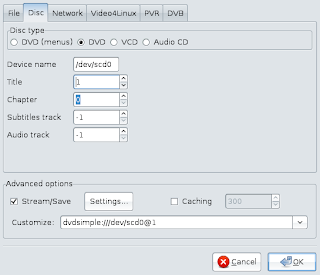 I've had to change some of the default settings.
First, I've set the disc type to DVD - not DVD (menus).
Second, I've selected the title number. It would have been nice if VLC had some way to figure out what title corresponds to what video on the DVD, but hey, nothing is perfect, right? You can use dvd::rip, if you have it to view the table of contents and figure out which title is which. You can also just run the transcode for a few seconds, and see if the resulting file is correct...
Lastly you need to click the check mark by the Stream/Save option, and click the settings button.
This brings up this window 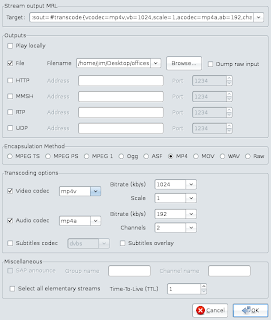 You need to adjust the following on this screen:First, Click the checkbox next to File, and then select the file name and location that you are going to create.
Second, change the encapsulation method to MP4.
Third, make sure the video codec is set to MP4V and the Audio to MP4A. you can change the bitrates if you want to, but I know the defaults work for me.
At this point I would like to make a note - the iPod supports the h264 codec, which is an option from this point. but I could not get it to create a file that would show video in my iPod (although it worked fine on my desktop)
now tell it OK to close this window. and OK again to the first window.
the vlc player will then run. At this point it does not show video, but the slider moves along as though it was. Don't be alarmed - this is how it works. You can stop the player, if you want to have an incomplete file that will work for testing, but you will need to start it over again to make the complete video. Once it is completed, upload to your iPod with Itunes, floola, or whatever you normally use.
 I was given an iPod for Christmas. It is an 80Gb black classic iPod, and my first.
To begin, I should say that the iPod is a nice piece of hardware, and the interface is pretty cool. I've had many MP3 players in my day, and this is one of the nicest ones, for sure.
However, I have some issues (of course) with the device.
First off, the fact that it only plays mp4 movies is pretty lame, because it is a pain to transcode files to play on this device. Luckily, I found a way to do such transcoding here which works ok.
The real issue is the decision by apple to modify the iPod's internal database. This sucks because my installation of amarok on Gutsy Ubuntu would shred the database when you add a file. This resulted in the iPod not seeing any of the files it had onboard. Following these instructions I was able to add files via Amarok, but even playing files with it blows up the album artwork on the iPod. I'm going to do some experimentation with Floola, and see if that has better results.
My understanding is that iPods worked just fine under Linux, and other media managers, before apple made their changes to the databases. It sure feels like this change was done to force people to use ITunes. I can understand that - Apple wants to keep folks tied to that system - but if that is the case, they should make a version for Linux. As of now, It is going to be difficult to justify purchasing another iPod, or recommending it to anyone.
UPDATE:
Floola works pretty damn well. It lets me manage music and videos, but not photos, which I don't need. While you can play music off the Ipod, it does not manage any other music sources. So it is not an all in one solution like Amarok, or Itunes try to be. Personally I don't care much about that, so Floola looks to be my iPod solution.
 I've had to change some of the default settings.


